Showing posts with label Make Money Online. Show all posts

Sunday, December 6, 2015

How to Make Money with Google Adsense

How to Make Money with Google Adsense

One way to make money with your website is to display ads on it. There are many advertising platforms but one of the most popular one is Google Adsense.
There are a few reasons for that; it`s free to sign up, it`s reliable and you can make some decent money with it.
Google Adsense is a reliable advertising platform, owned by Google, that connects publishers (blog owners), advertisers and potential customers.
As the publisher you will display ads on your website, if those ads are clicked on by a visitor you will get paid from Google Adsense.
In this article we will be talking about;
  • What kind of sites are  good for Google Adsense
  • How much money can you make with Adsense?
  • How to sign up and create an ad
  • WP Plugin that can save you a lot of time
  • Where to place your ads
  • Testing
  • Is it just sunshine and unicorns with Adsense?
  • 6 Action steps to set up your Adsense site

What Kind of Sites are Good for Adsense

A lot has changed the last few years when it comes to “Adsense sites”. Back in the day (say 5 years ago, I know way back when it comes to the online world) you could put up a 5 page WP blog targeted on a few specific keywords and make some decent money with Adsense. This model does NOT work anymore. Today you will need a quality, content rich site to make decent money with Adsense ads.
If you don`t have a site set up already the first thing you will have to do is figure out a niche, the topic of your website. Your site could be about anything, sports, interests, recipes, anything…
You want to find a niche that gets a lot of searches, with little competition. You also want to make sure that there are related ads to the niche. You can do that by doing a search in Google on a related keyword. So say that we are interested in making a site about smoothies.
google_adsense_ads
As you can see here, there are ads displayed which means that advertisers spend money on this niche.
Some sites are better suited for Adsense ads than others. What you will need is a high quality, content rich website. If you have a plain information site than Adsense might be a good fit.
Think of it like this, if you wanted to spend money on ads would you want your ad on your site? If you have good quality content then you probably would, right.
If you don`t have a site setup yet, then that is quick and easy to do with today`s technology. Check out my review of my #1 place to get started with a website/adsense site. They will show you step by step, for free, how to set up a website and get it ready for Adsense ads.
If you have a site already and want to make some money implementing Adsense ads keep reading…

How Much Money Can You Make with Adsense?

As a publisher you receive 68%, Google gets 32% of the revenue. This means that if the advertiser pays $2 for a click then you will make $1.36 and Google makes $0.64. This is one of Google`s largest income streams.
It`s impossible to say how much a site will make with ads, there are too many things to take into consideration. There are a few factors that you can look at though.
EPC – Earning Per Click
You can go after high EPC, earning per click, keywords and they pay up around $15 – $20 / click. Yes very high EPC but that space is usually pretty crowded and there is a lot of competition.
If you go after keywords with low EPC say under $1 / click then there is usually less competition but it will take more clicks to reach the same result as with the high EPC.
It will depend highly on the niche that you are in what the payouts are.
CTR – Click Through Rate
Another thing to look at is the CTR, click through rate. This varies greatly from site to site as well. I have plain Adsense sites with a CTR of 5-10%, then I have sites that are affiliate marketing / Adsense sites with a 1-2% CTR.
Let`s look at an example. Say you have a plain Adsense site, you have been working on your site for a few months, you provide quality content a few times a week. You have 5000 monthly visitors, you make $2 / click and you have a CTR of 4%. Very reasonable numbers…
5.000 visitors with 4% CTR is 200 clicks.
200 clicks à $2 is $400
There is one thing you will need to be able to make decent money with Adsense and that is lots of targeted traffic. The more targeted traffic you have the more you can possibly make.
Target the right keywords, go after the low competition keywords and rank your content in the search engines.

Can You Combine Adsense Ads with Affiliate Offers?

Yes, you can combine affiliate offers and ads. These are your options;
  • Only Affiliate offers
  • Combine Affiliate and Adsense ads
  • Only Adsense ads
What works best on your site, is something that you have to test.

How to Sign up with Google Adsense and Create an Ad

Before your sign up with Google Adsense you want to make sure you have your site in place. You want to have some helpful content on there or you run the risk of not getting approved. You also need your own domain. You cannot sign up with a subdomain like .siterubix.com.
You can sign up with Google Adsense for free, it can be done here.
When you are signed up, it`s time to create an Adsense ad.
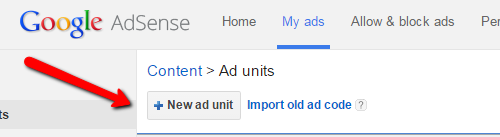
How to create an ad with the the Adsense tool.
adsense_create_ad
After you click “New ad unit” you will have to design your ad.
google_adsense_form
¤ sorry about the extra “e” in custom
When you have the ad code it is time to place it on your website where you want your ads to show. You have two options.
  1. You can paste the code where you want it, in a post, page or sidebar
  2. You can use a wp plugin to automate the code submission
If you use the first model to copy and paste the code, then you will have to do that with every single post and page where you want your ads to show. This can be good if you want to place an ad in the sidebar once.
If you are planning on submitting an ad in every post/page then I would suggest that you use a WP plugin to automate the process. By using a plugin your Adsense ads will be displayed with every new post/page according to your settings.
How to paste code manually in the sidebar
If you want to show an Adsense ad in the sidebar, go to the Widgets section over at your WP blog.
Add a text widget to the sidebar and place the Adsense code in the text widget. Click done/save and wait for the ad to show. Sometimes it will take a few minutes before it actually shows up.

Use a WP Plugin

I prefer using a plugin called Quick Adsense. With Quick Adsense you can set your ads to show at different positions. You can also set it to show posts and pages or your just posts.
Quick_Adsense

You paste the code, in the code section, and adjust the settings to where you want your ad/s to show. The ads will then automatically show on every post / page depending on your settings. You don`t want to show more than the 3 allowed ads /post or page. Again sometimes it will take a few minutes before the ads show.

Where to Place Your Ads

Personally I have gotten better results placing my ads in my content, not in the sidebar. This is something that you can always test though.
There has been discussions about placing ads above the fold and if that would hurt your rankings or not. I see many high ranking sites with an ad above the fold. They don`t crowd the space with ads but they show one, so if the no ad above the fold policy is true or not… not sure.
My personal take on it is for the user experience I find it better to not place ads above the fold. I don`t want the first thing my visitor see to be an Adsense ad. I place the ad/s in my content further down. I want to give my visitors a great experience that`s my number 1 priority.
There are certain areas that are better for ad placements than others, it depends on what kind of site you run as well so I suggest that you test your ad placement and try different things out. Record the changes and results and improve upon that.

Testing Testing Testing

Through out the article you have seen me mention “test” that. So to summarize it what can you be testing to increase CTR when it comes to Adsense ads? Here are 4 things you can test;
  • Text ad or banner ad
  • Ad placement
  • Ad size
  • Ads – affiliate offers – or both

Is It All Sunshine and Unicorns?

The biggest issue I`ve seen is that it`s hard to get in contact with Google Adsense if you have issues or questions. They give you the run around and there is just not an easy way to communicate with them, no email or phone number to call.
Know their rules, and play by them. Google will take action against any publisher that does not follow their rules and guidelines, so make sure you know them and follow them.

6 Action Steps to Set Up Your Money Making Adsense Site

  1. Find a profitable niche
  2. Set up a website
  3. Submit quality content on a regular basis to your site
  4. When you have some traffic apply for an Adsense account
  5. Create your Adsense ad and submit ads to your site
  6. Implement, analyze, test and improve
You don`t have to do this alone, I`m part of a great community that has a very active chat where you can get help from people that has done this successfully already. They also have a step by step training program for you to find a niche, set up a website and apply Adsense to it. You can find out more about it here, my #1 free way to make money online.
I hope you found this article helpful – How to Make Money with Google Adsense. I would love to hear what you have to say about it, do you use Adsense? Are you thinking to implement it on your site? Feel free to leave a comment below,
Have a productive day and a great week!

Google Adsense & Earnings

To make any sort of money with Adsense requires one of two things : a few pages with LOTS of traffic or a lot of pages with low to moderate traffic. Let's do the math. The average CTR (Click Through Rate, or the amount of people, expressed in percentage terms, that view the add and actually click on an ad) varies from publisher to publisher and web page to web page, but a 2% CTR is considered "good" in the web publishing industry. Thus, if the "Ads by Google" is displayed on your site 1000 times in a day (also known as how many impressions you get), if you have a 2% CTR, you can expect 20 clicks a day, on average.
How much you earn from each of those clicks is highly variable. Your earnings depend on your sites topic, internal Google algorithms as well as how much money advertisers are willing to "bid" in Google AdWords to have their ads displayed. There is no general rule how much you can earn for each click. On Big Sky Fishing, I've earned anywhere from between .04 cents per click on the low-end, to over $3.00 on the higher end. The average earnings per click tends to run between .20 cents and .30 cents, fluctuating somewhat during the year (higher in the summer, less in the winter).
So, for simplicity, let's say you earn .25 cents per click. And you get 20 clicks per day. This leads to a daily income of $5.00. From here, you can let your imagination run wild - coming up with all sorts of various earning potential estimates by varying the click-through rate, the amount paid per click, how many times your ad is displayed, etc...

Your Pages Content

More than anything else, the content of your page drives your earnings. Pages that are about specific topics and which are in high-demand by advertisers (and thus, there exists a lot of "ad inventory") will earn more money than general news pages or pages that are "multi-topic."
The moral of the story is this. For maximum Adsense revenue, it's generally good to have shorter pages that are laser focused on a specific topic.

Ad Placement

Ad placement is crucial in Google AdSense. If people don't click on your ads, no matter how many times they're displayed, you'll still earn nothing. Where you place ads really is dependent upon your site layout and your traffic. But, a good starting point on the best places to locate ads is by visiting the Google Heat Map page on the Adsense help section. 

I'll be the first to admit that Big Sky Fishing.Com is not a "model site" in terms of ad placement. On this site, most of my ads are displayed below the "fold"...that is, a visitor does not see them immediately when they view the page. Generally, and my statistics prove it, ads displayed "below the fold" have a lower click-through rate than those displayed "above the fold" (how much you earn "per-click" remains the same, but how many times people click on an ad is lower).

So, why do I keep the ads there? Simp...I have no better place for them. My site's layout is sort of set, and to make room for Google Ads "above the fold" wouldn't look good (and regular visitors wouldn't like them), require redoing my entire left-side menu system or redesigning the whole layout (especially the top header) of the site. Ultimately, and also because my content pages tend to run a 1.5% to 2% CTR, I've decided to leave things as they are. I guess I'm a believer in NOT forcing ads on people. And if that means acccepting less income in the short-term, then so be it.

Ad Blending

The term ad blending refers to how your ads "blend in" with the content of your page. The general  idea is to make your ads "blend in" with your content, in hopes that people won’t simply ignore them due to ad blindness.

There is logic behind this, and to some degree, I use this logic on Big Sky Fishing. However, for several years, many Adsense publishers pushed this to the extreme, laying out the ads in such a way so as to confuse visitors about "what was an ad" and "what was a link." In particular, what was popular was putting a graphic just above a horizontal banner, leading visitors to the site to believe that they were clicking on a menu choice and not an ad.

This was bad for visitors to the web page (it was a huge inconvenience) and, moreover, it was also bad for the advertisers (people were clicking on the ads by "accident" instead of "deliberately"). As such, Google changed their policy, requiring that all ads not be "so blended into" the content of the page that they are indistinguishable from normal links on the web page.

Additionally, fooling your web site visitors is a one-trick pony. Would you visit a web page ever again if you thought you were clicking on an interesting menu link...only to be whisked away to someplace else? Remember, web publishing is more than just about "making money" NOW. It's about having a web site that makes money today AND tomorrow.

Conclusion

Let's summarize this length article. You, as a publisher, can earn money simply by writing content by using Google AdSense. You simply sign up for their program (you must have a website to do this), post your content, slap an Adsense banner on your site, and pres...you’re in business.

How much money you make depends entirely on how much traffic you get to your site. Scant  traffic = little to no income. Additional factors that impact your earnings include your sites "niche," the actual content of the web page itself, the time of year, how you place your ads, and several other things, too.
There are many true success stories about Adsense publishers earning $10,000 or more a month. However, the ranks of these Adsense publishers are small. If you’re just starting out, don’t expect to be pulling down $1000's of dollars a few months later. While it can happen, the odds are long. Instead, Adsense earnings tend to increase slowly - as you expand your site and as more people find it. 

Long-term success with Google Adsense requires writing quality content that will, over time, draw in people to your site. Google Adsense, except for a few lucky people, is not a get-rich quick scheme. Instead, Adsense provides a nifty way to have a "anything but steady" monthly supplemental income...all for doing something you enjoy doing (publishing content on the Internet).

Thursday, December 3, 2015

BlueHost Affiliate Programs for Bloggers to Make Money Online

BlueHost The Best Affiliate Programs for Bloggers to Make Money Online

Whether you know it or not, affiliate marketing is the best way to make money online while you sleep.
Affiliate marketing helps you make more sales with limited traffic and limited budget. You don’t have to drive thousands of visitors from search engines to increase your sales through affiliate marketing. But you have to drive “most targeted visitors” to increase your affiliate sales.
 
Finding and promoting the best affiliate programs on your blogs or websites is the #1 key to increase your affiliate income. Are you thinking to use affiliate marketing to monetize your websites? Affiliate marketing is undoubtedly the BEST way to make money online.
Here are few considerations before choosing the best affiliate programs.
  • Make sure to test and analyze different affiliate programs that suit your readers needs
  • Use standalone pages to increase your sales
  • Build an email list, create awareness about your products and increase your income through affiliate marketing
If you are searching for best affiliate programs for bloggers, don’t search beyond you are going to discover few of the top affiliate programs that pay you great amount of affiliate commission each and every month.

Best affiliate programs for bloggers

best affiliate programs for bloggers
Here are few best affiliate programs for bloggers who are searching for ways to increase their affiliate sales and income.

Bluehost web hosting service: the #1 reliable hosting for bloggers


What this affiliate program is all about?
Bluehost is the top most reliable web hosting service for bloggers. Bluehost is used by millions of bloggers worldwide, it not only gives you more security and speed but it also comes at an affordable price. You just have to pay $3.95 per month to get their awesome hosting services.
 
How much can you make per one sale?
If you can convince your readers to start their own blogs using Bluehost, you can earn $65 per referral. If you can make 10 sales from Bluehost every month, you will be making more than $650 and that is a decent amount for most bloggers.

Important things to remember:
Signup for their affiliate program, link your Paypal address and you will start receiving money when you make successful sales on Bluehost web hosting service. You have to wait around 60 days to get your money on your account after each successful sale.